Show your latest posts anywhere
Put your three newest blog posts on your home page, or a list of projects on your about page, with one Markdown block, and know when to use Obsidian Bases instead.

Give it this page as Markdown: https://flowershow.app/blog/show-a-list-of-pages-anywhere.md. Or install the Flowershow skill so it knows how to write list blocks for you: tell your agent "Install the Flowershow skill from https://raw.githubusercontent.com/flowershow/skills/main/SKILL.md" (more options in Skills). The whole site is indexed at https://flowershow.app/llms.txt.
You want a short list of pages inside a page you already have: your three latest posts on the home page, your projects on your about page. On Flowershow that's one small block of Markdown, and it works on any page: the home page, an about page, a docs page, a blog post.
(If you want a whole page that is the index, like /blog or a team page, see Build a blog, portfolio or team page.)
What you'll build
Here is the block you'll write:
```blog
limit: 3
```
And here it is, running on this page. These are the three newest posts on this blog (a list never includes the page it's on, so this post isn't in it):

Build a blog, portfolio or team page
Turn a folder of Markdown pages into a blog index, a grid of projects or a team page on Flowershow, with no code: a folder name or one line of frontmatter.

What you can change in Flowershow theming, and who can
An honest map of the four layers of Flowershow theming — what a theme can change, what only a site owner can change, and what nobody can change without a pull request.

Flowershow's direction: finding the sweet spot
Reflections on Flowershow's product boundary, and why its strength is opinionated markdown publishing rather than becoming a lighter Astro.
You'll learn how to put a list like this on any page, how to point it at a folder other than blog/, and when to reach for Obsidian Bases instead.
You'll need: a Flowershow site with a few posts in a blog/ folder, each with a title and a date in its frontmatter. For Step 2, a second folder of pages, such as projects/. Time: about 5 minutes.
Step 1: Add a blog block to your home page
Open your home page's file: the README.md (or index.md) at the top of your site. Where you want the posts to appear, add this:
## Latest posts

```blog
limit: 3
```

[All posts →](/blog)
Publish or sync your site as you normally do, then open the home page. You should see your three newest posts under "Latest posts", each with its title, description, image (if it has one), date and authors:
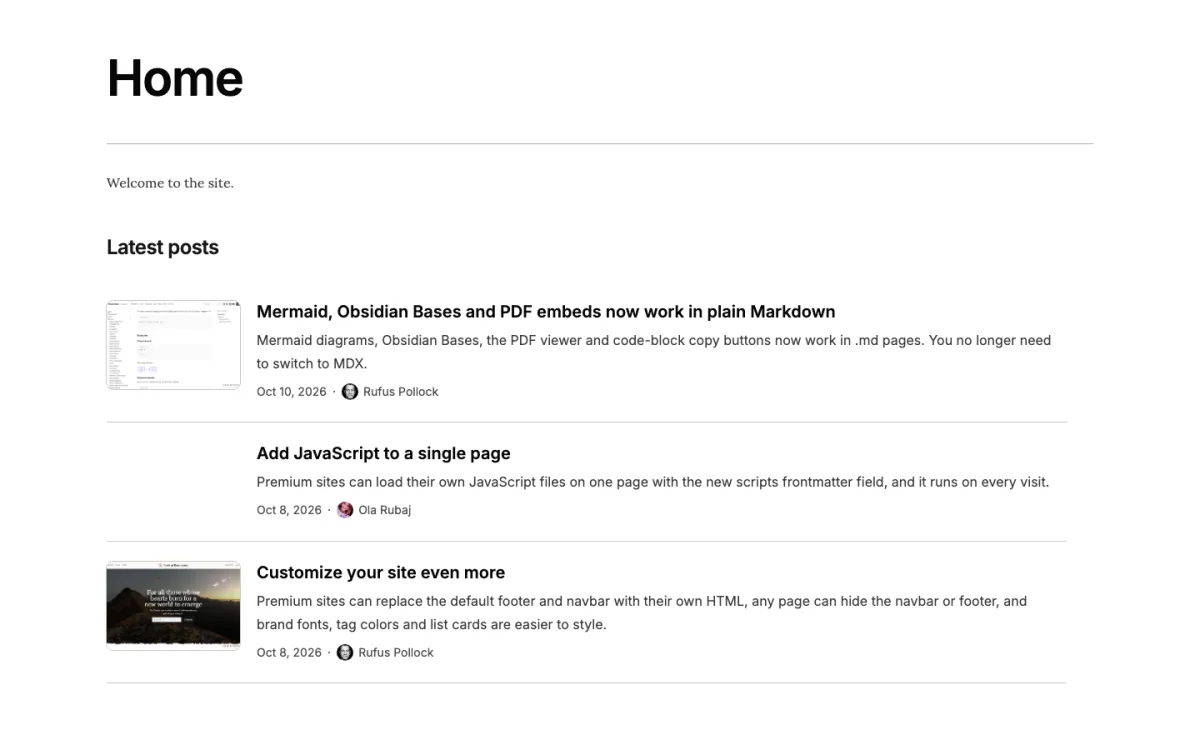
A ```blog block lists the blog/ folder and its subfolders, newest first; limit: 3 shows only the first three and never adds page links. The heading and the "All posts" link are ordinary Markdown, there to help readers. The same block works on any other page too. Use a .md page if you can: in an .mdx page the list appears just after the page loads. In Obsidian the block shows as a plain code block, so nothing breaks in your vault.
Step 2: List a different folder on another page
To list any other folder, use a ```list block and name the folder with from. For example, open your about.md and add your projects:
## What I'm working on

```list
from: projects
```
from is the folder's path from the top of your site (from: notes/books works too). Publish again and open /about. You should see every page in projects/, in the same rows as your posts: newest first, then any undated pages by title.
That's the fast path: a ```blog block for posts, a ```list block for anything else.
Step 3: Choose Obsidian Bases when you need more
List blocks cover lists from a folder: newest first or sorted by a field, simple filters with where (tags: [design], date: upcoming), and a few views. If you need more than that, use an Obsidian Bases block instead. Flowershow renders ```base blocks in .md pages too.
| Use a list block when you want | Use an Obsidian Bases block when you want |
|---|---|
| The latest posts, a grid of projects, a team page | A table with columns, or summaries like sums and averages |
| Dates, authors, images and page links styled for a blog | or and not filters, comparisons (>, <), formulas |
| A few lines you can write from memory | The same view you built in Obsidian's Bases editor |
For example, this block lists the posts in blog/ whose file name contains "bases" or "listing" (something a list block's where can't do) as a table:
```base
filters:
  and:
    - file.inFolder("blog")
    - or:
        - file.name.contains("bases")
        - file.name.contains("listing")
views:
  - type: table
    name: Posts about lists
    order:
      - file.name
      - title
```
And here it is, live:
You should see a table with one row per matching post. Bases support on Flowershow is in beta, and a few Obsidian features (such as this, the embedding file's properties) aren't supported yet: check the Obsidian Bases reference before you rely on one.
Troubleshooting
- The block shows as code on the live page. Check the fence: three backticks followed directly by
blog,listorbase, with nothing else on that line. - You see a "List block has problems" card. A key or folder name is wrong. The card says what to fix, for example
Unknown key "perPage". Use "pageSize".orNo folder "posts" with pages. Folders with pages: blog, notes. - "Nothing here yet." The folder exists but has nothing to list. Pages with
draft: trueorpublish: falseare left out. - The posts are in the wrong order. Lists sort by each page's
date(or, if it has none,pubDate,published,publishDate,created, or aYYYY-MM-DDat the start of the file name). Posts without a date go last.
Next steps
- Cards instead of rows:
view: grid. One line per post:view: compact. A big featured post on top:featured: 1. See Listing pages. - Only some posts, e.g. related posts at the end of a post:
where: { tags: [garden] }. Hide dates for projects:fields: { date: none }. Both in Listing pages. - A whole page that lists a folder (
/blog, a portfolio, a team page): Build a blog, portfolio or team page. - Setting up a blog from scratch: Publishing a blog.